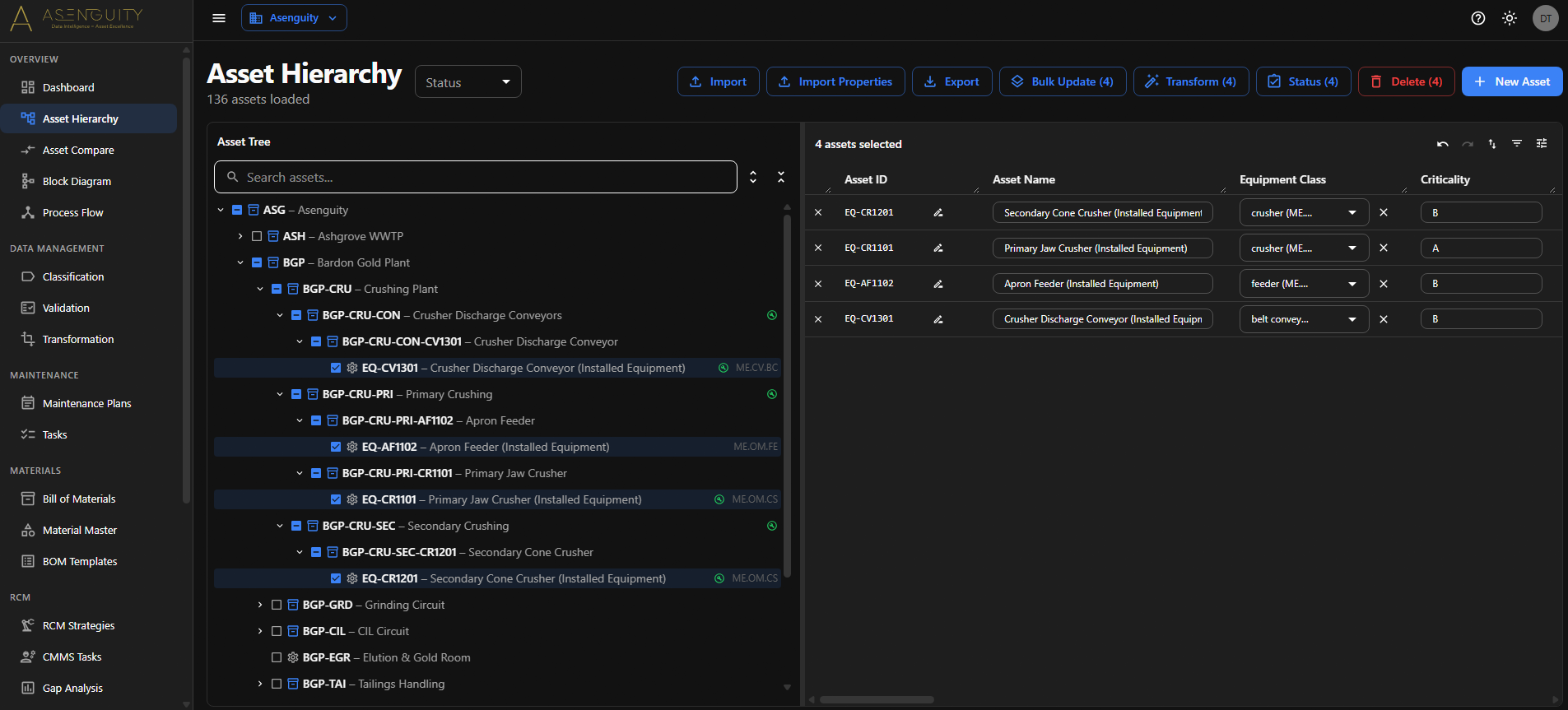
Asset Hierarchy Workspace
A virtualised tree view handles tens of thousands of assets with drag-and-drop reparenting, multi-select, and a split-panel inline edit table beside it. Per-row save, Save All for batch edits, soft delete with cascade, and a right-click menu for Add Child, Delete, and Create from Template.
Smart Import & Mapping Templates
Three-step wizard (Upload → Map → Preview) accepting CSV, JSON, Excel, and TSV. Auto-mapping by fuzzy column matching, client-side duplicate detection with field-by-field accept/reject, and a two-pass upsert that resolves parent references. Save the mapping once — it pre-fills future imports and defines export headers, so the same file format round-trips cleanly.
Configurable Columns & Custom Fields
Admins toggle column visibility, reorder, and add custom fields (text, number, select with options, boolean) backed by a typed JSON store. Custom fields flow through import, edit, and export the same way standard fields do.
Asset Comparison
Dedicated /assets/compare page diffs any two assets side-by-side, field-by-field — standard fields and custom fields, with match and diff indicators. Built for QA, migration sanity-checks, and brownfield reconciliation.
Create from Equipment Templates
Right-click an asset, pick a CFIHOS-aligned equipment unit template from the global library, and the workbench pre-fills the unit's standard sub-units as children. Edit the IDs, names, and tags, uncheck what you don't need, and ship.
Classification Rule Engine
Five rule types — component type, category, prefix extraction, system prefix, and regex extraction — auto-populate custom fields based on patterns in your data. Run across the whole tenant in one click or scope to a selection.
Validation Rule Engine
Four rule types — mandatory value, character length, regex match, and parent-child column match — flag data quality issues in a filterable, severity-tagged report. Run before exports, before migrations, before audits.
Transformation Rule Engine
Four rule types — concatenation, copy, regex extract, and conditional — reshape field values across thousands of rows. Each rule shows a before/after preview against 20 sample rows so you can sanity-check before committing.
Maintenance Planning
CRUD for maintenance plans with grouping IDs, descriptions, frequencies, and asset lists. Plan duplication clones an existing plan as a starting point. CSV import/export via the same wizard the asset module uses.
Task & Operation Management
A reusable task catalogue with task_id, descriptions, operations, resources, capacities, and durations. Tasks are referenced by maintenance plans and strategies — define once, reuse everywhere.
RCM Strategy Management
RCM strategies tied to equipment classes, task types, frequencies, disciplines, and standards references. Inline editing with dirty-row tracking, bulk update across selected strategies, and an asset-assignment dialog that filters candidates by equipment class. Compare-and-diff import shows every row as NEW / UPDATED / UNCHANGED / MISSING / ERROR before you apply.
Strategy-to-Plan Generation
Auto-generate maintenance plans from selected RCM strategies in one click. Manual mode surfaces incomplete items as warnings rather than blocking errors — the plan is still created with placeholders, and you fix them later.
Bills of Materials & Material Master
BOM catalogue with line-item content, asset-to-BOM linking, and a material master keyed on material_id carrying description, type, UOM, unit price, and manufacturer. CSV import/export on both.
CFIHOS Compliance Suite
Browse the full CFIHOS tag-class and equipment-class hierarchies with property tables. Bulk-assign your tenant's tag-types to CFIHOS tag and equipment classes. Capture per-asset property values with picklist validation and a live completion percentage.
Central Repository for Downstream Systems
One aligned dataset across hierarchies, classification, maintenance, BOMs, and CFIHOS. Export migration-ready packages tailored to the destination — ERP (SAP, Oracle, IFS), CMMS (Maximo, eMaint, Hexagon), DMS, RAM, and APM.
Dashboard & KPIs
A tenant-wide dashboard with six stat tiles (assets, plans, tasks, BOMs, strategies, materials), an Assets-by-Criticality pie chart, and an Assets-by-Equipment-Class horizontal bar chart for the top ten classes.
Bulk Operations
Bulk update across selected assets — equipment class, criticality, tag, parent, tag class, sort order — each with a per-field enable checkbox. Bulk soft-delete (cascading, restorable) or hard-delete. Transform Selected runs active rules against only the chosen rows.